
Articles tagged with 'diagnostics'

Mind your spelling

In the previous post we introducted Diagnostics our tools to automate checking of study builds against best practices, making it quick and easy to identify, fix and document issues.

One best practice which should always be followed for Rave study builds is to check that words on forms, query messages and other text strings are spelled correctly. This can't be done, other than by manual inspection, in Rave at all, and isn't easy to do in an exported spreadsheet. eCRFs contain lots of medical terms and can contain HTML tags embedded in the strings, both of which can pose challenges.

Examples of misspellings we've found include:

  • narcostic
  • recoreded
  • procotol
  • hepatobilary

Finding and correcting mistakes like these isn't easy without a tool designed to help. The best practice recommendation is to download the Architect Loader Spreadsheet for the Draft, open it in Microsoft Excel and use the spellcheck function to review the appropriate columns.

The TrialGrid Way

The TrialGrid spelling Diagnostic checks all the text strings in a study against a dictionary of English words and a medical dictionary. Possible misspellings are highlighted so it's easy to review:
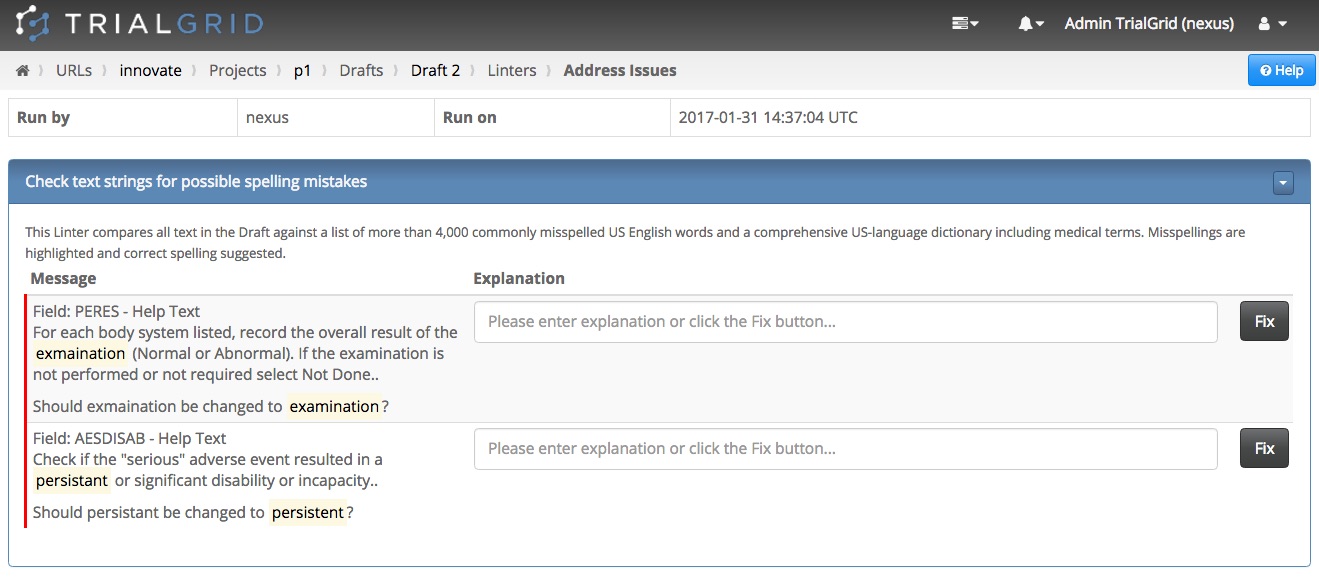
Spelling

Fixing the spelling mistake is as easy as clicking the 'Fix' button. Any results flagged by the TrialGrid spell checker which are actually correct can be documented, so that there's an audit trail of when the Diagnostic was run, what issues were found and what action taken.

TrialGrid Diagnostics take a time-consuming activity that requires expert knowledge and transform it into a few clicks to get assurance of conformance to best practice and a full PDF report output to document the results. With more than 50 Diagnostics (and more being added all the time), using TrialGrid could save your Study Builders hundreds of hours of manual effort.

Interested? You can read more about TrialGrid features on our tour page

Image

Better Rave Study Build Quality, Faster

To get the best out of Medidata Rave there are a set of Best Practices which should be followed when building studies. For example, Rave’s Clinical Views will not allow reserved words to be used as Field OIDs; Medidata publishes Rave Technical Note 22 which lists these reserved words in detail. In total the list runs to 8 pages with more than 200 reserved words.

Many organisation adopt a checklist approach to try and ensure quality. These checklists can easily contain 100 or more recommendations. For many of the items on these checklists the easiest way to check for conformance is to download the Architect Loader Spreadsheet (ALS) and use the filtering in Microsoft Excel to inspect data values. Corrections can then be made to the ALS and it can be re-loaded into Rave Architect.

Example checks to be performed manually in this way include:

  • Does the input control (Checkbox, Text, LongText, RadioButton) match the data format ?
  • Does the data format for Data Dictionary fields allow for the longest coded value length?
  • Are derived fields easily identified by a standard naming convention?
  • Are Field OID lengths compatible with SAS v5/v6?
  • Has RecordPosition been correctly used in Edit Checks for standard fields?
  • Do all Fields using the same Data Dictionary have identical data formats?

Completing these checks, documenting that they have been performed and explaining any deviations is so time consuming that generally these kinds of checklists are only used as a final quality check before go-live or before a major amendment.

The TrialGrid Way

Our mission is to improve the quality of Medidata Rave study builds and to reduce the burden of assuring that quality. We take these pre-flight checklists and turn them into Diagnostics, automated quality checks that can be run at any time against the study build. Ideally these quality checks would be performed during study build when small problems can be quickly fixed.

This is exactly what Diagnostics were designed to do. Study builders can run the Diagnostics at a click of a button and fix issues just as quickly. If the Diagnostic identifies an issue, applying the suggested fix can be done with a single click. The change is audit trailed and if there is a deviation that requires explanation it can be entered right there so that any future run of that Diagnostic for the project will not report on that explained issue.

TrialGrid Diagnostics take a time-consuming activity that requires expert knowledge and transform it into a few clicks to get assurance of conformance to best practice and a full PDF report output to document the results. With more than 50 Diagnostics (and more being added all the time), using TrialGrid could save your Study Builders hundreds of hours of manual effort.

Interested? You can read more about TrialGrid features on our tour page